
Exploring Graphene by PolyChrome DSP
Graphene - PolyChrome DSP
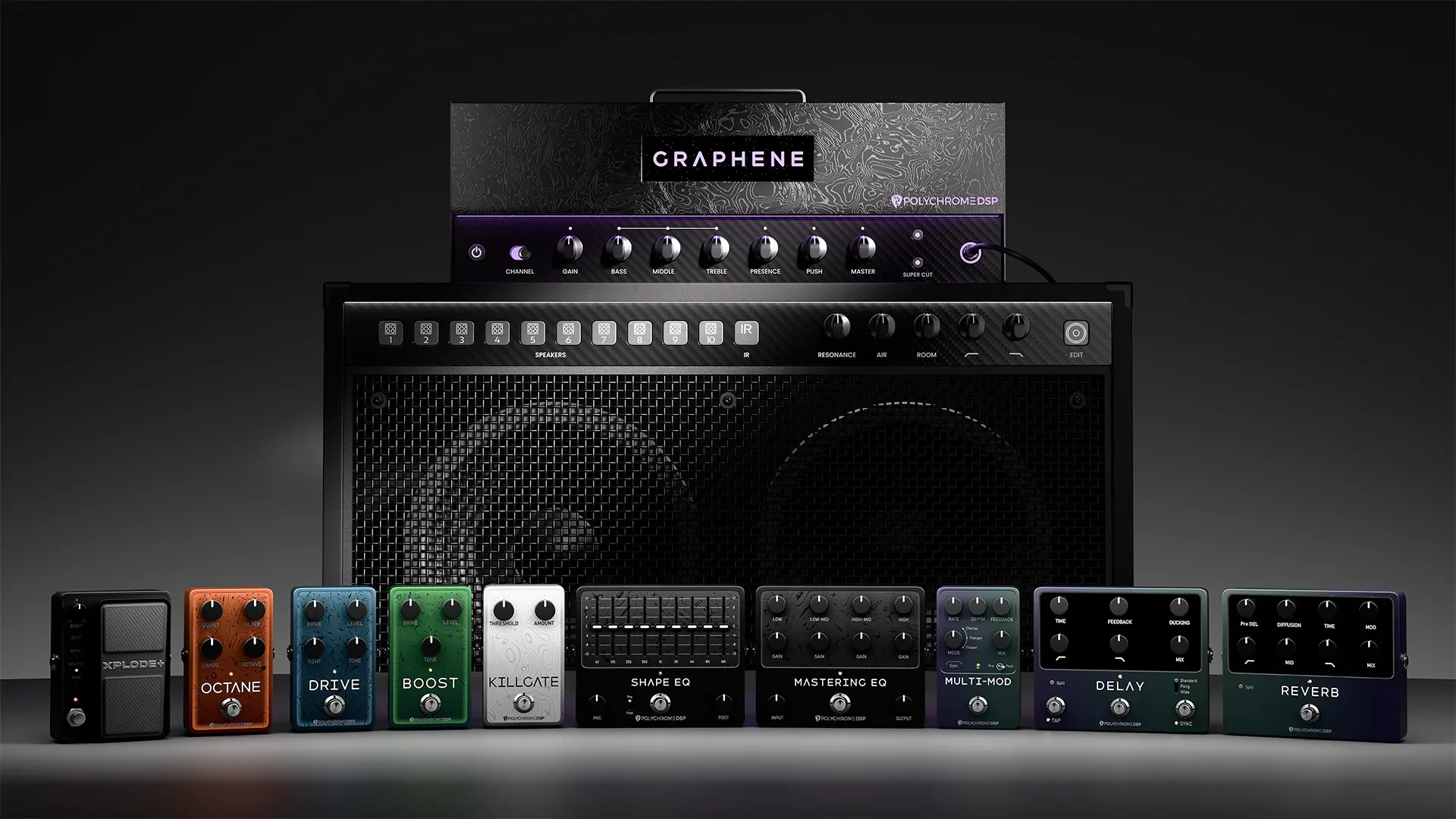
Today, we explore Graphene, the latest guitar plugin from Polychrome DSP. This comprehensive amp simulator and effects suite offers a dual-channel amplifier, extensive effects, and customizable speaker options, making it a powerful tool for guitarists and studio engineers. We break down its features, including the user interface, amp controls, pre-effects, speaker section, EQ, and post-effects, providing insights into how to dial in tones effectively.
Welcome to another exploration of the latest innovations in the guitar plugin world! Today, we’re diving into Graphene from Polychrome DSP, a plugin that promises to elevate your guitar sound to new heights. Graphene is a comprehensive amp simulator and effects suite designed for modern guitar players and studio engineers alike. It features a dual-channel amplifier, a wide array of effects, speaker chains, and EQ options, all packed into a single plugin that could replace a few. This extensive sonic capability makes it a must-have for anyone looking for modern, high gain guitar sounds.
User Interface and Navigation
Polychrome DSP has always prioritized user experience, and Graphene is no exception. The plugin boasts a sleek, modern interface that is visually appealing and easy to navigate. Guitar players often listen with their eyes first, and PolyChrome DSP has always understood this by providing unique, super sleek GUI designs with their plugins. The good news is, they sound great too. What a deal.
Toolbar Features
Upon launching Graphene, the first thing you’ll want to do is to click the Polychrome DSP logo in the upper left corner. This reveals some essential options for optimizing your experience, including:
Input Calibration: Adjusts the input levels for optimal performance.
User Paths: Customizes where your presets and files are stored.
Oversampling: Enhances audio quality by reducing aliasing.
Next, the Wide Control allows you to widen the stereo image of your signal, adding depth and excitement to your tone. The Hypertune Control is another standout feature, enabling pitch shifting and transposing of your signal by up to an octave.
Presets and Controls
Graphene comes loaded with a massive collection of presets to kickstart your sound design. You can mark your favorites with the G icon, making it easy to return to tones you love. PolyChrome DSP has always been VERY generous with their inclusion of tons of presets from in-house talent and collaborators. Most of them don’t need an ounce of tweaking, but you’re certainly welcome to go nuts. The plugin also includes standard controls like input gain and noise gate, as well as a post-effect compressor and output gain control.
The Heart of GraphEne: The Dual Channel Amplifier
At the core of Graphene is its ultra-sleek dual-channel amplifier. The blue channel is tailored for tight, focused rhythms, while the purple channel delivers a scooped, aggressive tone ideal for modern sounds. Both channels feature standard amp controls along with unique options:
Push Control: Adds saturation for a richer sound.
Super Cut Control: Provides a lo-fi effect reminiscent of the Nutcracker amp.
Tight Control: Enhances low-end precision on the blue channel.
Mid Boost Option: Increases clarity for leads on the purple channel.
Personally, I found the blue channel to have a certain depth and weight to it in the mid-range that I preferred. That said, the Purple channel offers you instant access to more scooped, and less boomy tones that might work better for you. The mid boost does fill it out a bit, and at higher levels, helps the purple channel to feel a bit warmer.
Pre-Effect Stomps
Graphene's pre-effect section is packed with innovative pedals:
Explode + Pedal: Features a whammy effect, lowpass sweep filter, blend control, stutter control, and a unique reverb that increases in size with pedal articulation.
Killgate: Offers dynamic noise gate control, perfect for high-gain tones without choking dynamics.
Octane Pedal: Provides punch and tightness with boost and filter controls, plus a chaos feature for added distortion.
Drive Pedal: A modern precision drive for enhancing high-gain tones.
Boost Pedal: A traditional boost with a smooth attack and mid-range punch.
I was surprised by the aggressiveness of the boost included in the Octane pedal. Even at low levels, with the “Chaos” feature off, it provided a bright, tight bite to the amp that I found to be great for articulate rhythms and chugs. The Drive pedal is well rounded, modern and has great options. Finally, I appreciate the simplicity of the interface on the Screamer style pedal. If you know it, you love it, and you don’t want it messed with.
Speaker Section
Graphene features ten fully produced speaker chains and a custom IR slot for loading your own impulse responses. The speaker section includes:
Resonance and Air Controls: For further tone customization.
Room level control: Perfect for adding some space and width.
High and Low Pass Filters: To shape your sound.
Edit Control: Allows for detailed frequency manipulation, showcasing Polychrome DSP's understanding of guitarists' needs.
You’ll find yourself falling in love with the EDIT control. Not only is it a great way to learn about sound, but it offers an incredible array of chosen frequencies to manipulate. The best part is you can undo all of it with a single button.
EQ Section
The EQ section in Graphene is another highlight, featuring:
Shape EQ: Nine bands of control with pre and post EQ options.
Mastering EQ: For precise sculpting of your post-amplifier signal.
These EQ pedals are designed to be user-friendly, making it easy to experiment and find the perfect sound. Don’t be intimidated by the “pedal style” EQ’s. They’re easier than you think to dial in.
Post-Effects Section
As a lead player primarily, the post-effects section is where Graphene truly shines for me:
Multi-mod Pedal: Combines chorus, flanger, and phaser effects, allowing for total customization.
Delay Pedal: Features a spill effect that continues the delay trails even after the module is turned off, along with ducking control and multiple modes.
Reverb Pedal: Offers pre-delay, diffusion, modulation, EQ effects, and mix controls for atmospheric soundscapes.
Polychrome DSP is known for its exceptional post-effects, and Graphene continues this tradition, making it easy to achieve the sounds you’ve been dreaming of.
Conclusion
Graphene from Polychrome DSP is a powerful tool for guitarists and studio engineers alike. With its extensive features, intuitive interface, and high-quality sound, it stands out in the crowded market of guitar plugins. Whether you're dialing in aggressive tones or exploring ambient soundscapes, Graphene provides the tools you need to unleash your creativity.
Make sure to check out Graphene for yourself and explore the vast sonic possibilities it offers.
Reviewed By Josh Hammond - Skycrest Studio Works, Helena MT.